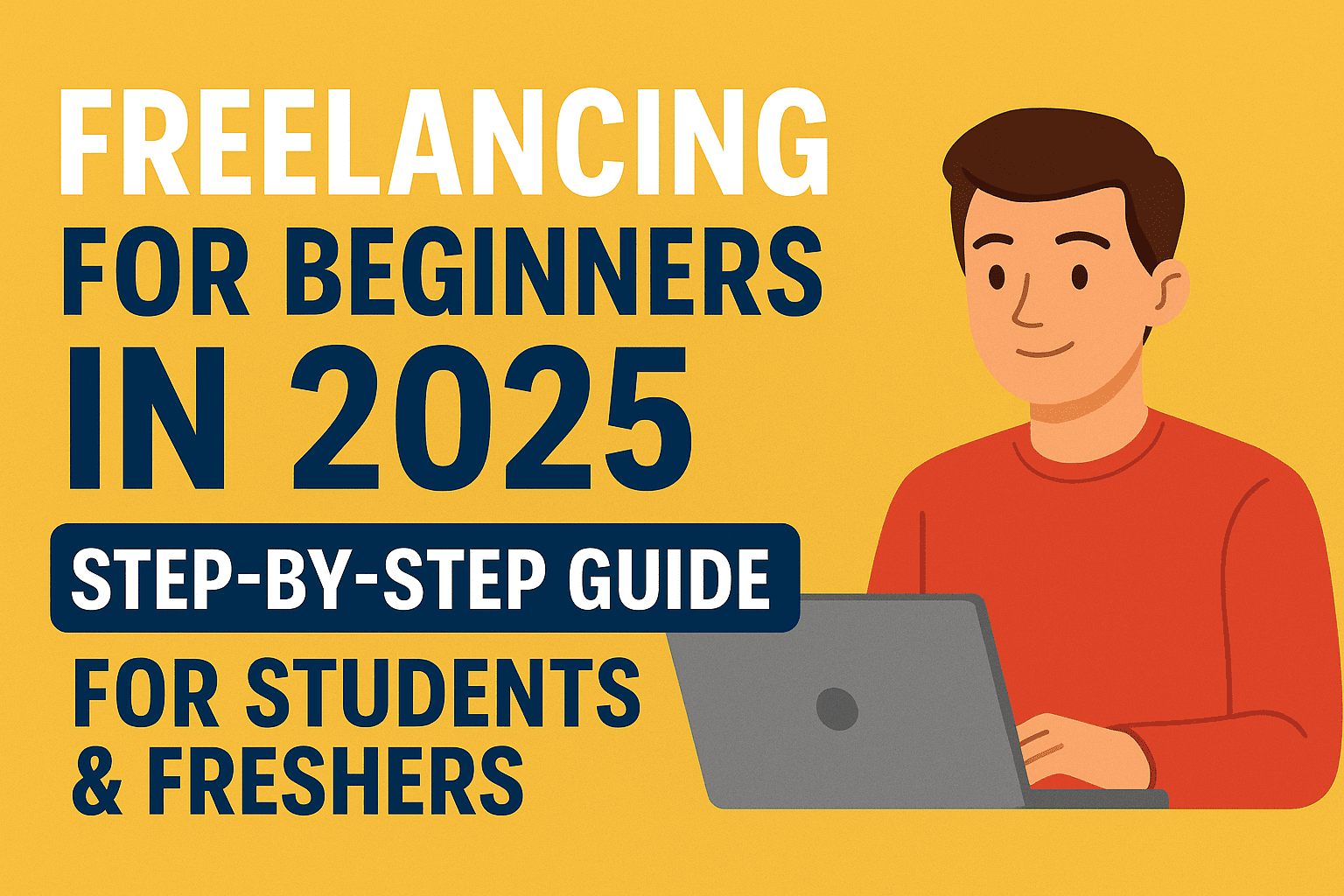
Introduction to Freelancing for Beginners: The Promise of Freedom (and the Reality of Hard Work)
If you are reading this, you probably have a dream. Maybe you want to pay your own college tuition, buy that expensive laptop your parents can’t afford, or simply stop asking for pocket money or you may see the job market in 2025 is scary. Layoffs are everywhere. But if you are reading this, you are looking for the one thing a job can’t give you: Control. I know both of these feelings.
Four years ago, I was sitting in my hostel room, staring at a code assignment for my Computer Science degree. I was broke, tired, and stressed. I knew how to write code, but I didn’t know how to turn that into money. I saw people on YouTube talking about “earning in dollars” while sleeping, but none of them showed me how to actually write the first email or write the first line of code for a paying client.
Fast forward to 2025. I’ve completed my Master’s in Computer Science, but more importantly, I’ve built a full-time career as a freelancer in the SEO and Website Development niche. I’ve worked with clients from the US, UK, and India, all while managing my semester exams and project submissions.
Here is the truth: Freelancing is not a “get rich quick” scheme. It is a business. And in 2025, with AI tools like ChatGPT and Gemini, the game has changed completely.
This guide is not just theory for Freelancing for Beginners. It is the roadmap I wish I had when I started. It covers everything from choosing your skill to landing your first client, specifically tailored for students and freshers who have zero experience. Let’s get to work.
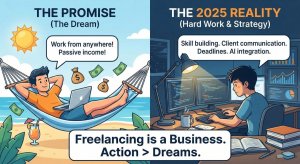
Chapter 1: What is Freelancing? (Debunking the “Laptop Lifestyle”) First step in Freelancing for Beginners
Before we talk about how, we need to agree on what.
Freelancing simply means you are self-employed and hired to work for different companies on particular assignments.
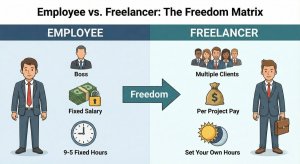
- Employee: works for one boss, gets a fixed salary, works fixed hours.
- Freelancer: works for multiple clients, charges per project/hour, sets their own hours.
The 3 Biggest Myths Stopping You
Myth #1: “I need to be an expert before I start.”
- Reality: You don’t need to be in the top 1% to get paid. You only need to know more than your client. If a business owner doesn’t know how to install WordPress, and you do—you are the expert to them. I started when I barely knew HTML. I learned on the job.
Myth #2: “The market is too saturated in 2025.”
- Reality: The market is saturated with low-quality freelancers who use AI to write garbage. There is a massive shortage of reliable freelancers who communicate well and meet deadlines. The saturation is at the bottom, not the top.
Myth #3: “I need a fancy portfolio website.”
- Reality: My first “portfolio” was a Google Drive folder with three PDF documents. Clients don’t care about your logo; they care if you can solve their problem.
Chapter 2: The 2025 Landscape – How AI Changed Everything
If you are starting freelancing in 2025, you have a massive advantage over someone who started in 2020: Artificial Intelligence.
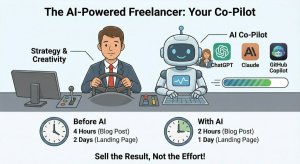
In the past, writing a blog post took 4 hours. Coding a landing page took 2 days.
Today, with tools like ChatGPT, Claude, and GitHub Copilot, you can do the same work in 50% of the time.
The “AI Threat” vs. The “AI Opportunity”
Many beginners ask me: “Tarun, will AI take my freelance job?”
The answer is No. AI will not replace you. A freelancer using AI will replace you.
- Don’t be a Robot: If you just copy-paste from ChatGPT, you have no value. Clients can do that themselves.
- Be the Pilot: Use AI to speed up your research, draft outlines, or debug code. But use your human brain to add strategy, emotion, and final polish.
The Golden Rule for 2025:
Sell the result, not the effort. Clients don’t care if you used AI to write the code faster. They care that the website loads in under 2 seconds.
Chapter 3: Step 1 – Choosing Your Niche (Your Skill)
You cannot “freelance” everything. You need a specific skill. Since you are a beginner, you might feel you have no skills. Trust me, you do.
Here are the 3 main “High-Income Skills” I recommend for 2025, based on market demand and barrier to entry.
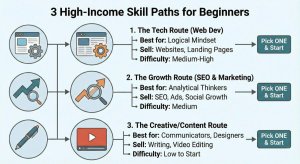
1. The Tech Route (Website Development)
- Best for: Students with a logical mindset, CS/IT students (like me), or anyone who likes building things.
- What you sell: Building business websites, landing pages, or fixing bugs.
- Why it pays well: Every business needs a website. It is a tangible asset.
- Difficulty: Medium-High.
2. The Growth Route (SEO & Digital Marketing)
- Best for: Analytical thinkers who like patterns, research, and data.
- What you sell: Helping websites rank on Google (SEO), managing Google Ads, or growing social media accounts.
- Why it pays well: You are directly helping the client make money.
- Difficulty: Medium.
3. The Creative/Content Route
- Best for: Good communicators, writers, and designers.
- What you sell: Blog writing, video editing (huge demand for Reels/Shorts), or graphic design.
- Why it pays well: Content is the fuel of the internet.
- Difficulty: Low to start, High to master.
Tarun’s Advice: Don’t overthink this. Pick ONE. You can always change it later. I started with “Content Writing” because I didn’t have confidence in my coding. Six months later, I switched to Web Development. Action is better than perfection.
Read our complete guide on finding a niche that suits your skill and passion, “How to Choose the Right Freelancing Niche: A Step-by-Step Guide for Beginners (2025)“
Chapter 4: Step 2 – Building the “Invisible” Portfolio
“But Tarun, how can I get a client if I have no experience? And how can I get experience if I have no clients?”
This is the classic fresher paradox. The solution is the Mock Project Strategy.
You do not need a real client to build a portfolio. You just need to show that you can do the work.
How to Create Mock Projects (The Weekend Plan)
If you chose Web Development:
- Find a local restaurant or gym that has a terrible website (or no website).
- Re-design their homepage on your local computer using WordPress or HTML/CSS.
- Take screenshots of your design.
- Boom. That is your portfolio piece.
If you chose SEO:
- Pick a topic you love (e.g., “Best Gaming Laptops under $1000”).
- Do keyword research using free tools (I’ll cover this in a future post).
- Create a spreadsheet showing the keywords, search volume, and content strategy.
- This spreadsheet is your portfolio. It shows you know how to think.
If you chose Content Writing:
- Write 3 articles on Medium.com or LinkedIn Articles.
- Make sure they are formatted beautifully.
- Share the links.
The “BeViralEl” Standard:
Never send a client a ZIP file. It looks suspicious.
- Good: A Google Drive folder link.
- Better: A Notion page showcasing your work.
- Best: Your own personal website.
Chapter 5: Step 3 – Pricing Yourself as a Beginner
This is where 90% of students fail. They either charge too little (and get exploited) or charge too much (and get ignored).
The “Hourly vs. Fixed” Dilemma
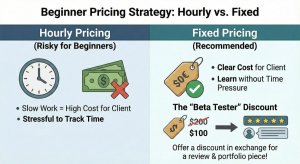
For beginners, I always recommend Fixed Pricing.
Why? Because you are slow.
If you charge $10/hour and it takes you 10 hours to code a simple header because you are learning, the client won’t want to pay $100 for a header.
If you say “I will build the header for $50,” the client is happy with the price, and you can take as much time as you need to learn and finish it without stress.
The “Beta Tester” Discount
When you pitch your first 3 clients, use this script:
“My standard rate for this service is $200. However, since I am building my portfolio on this platform, I am happy to do it for $100 in exchange for a 5-star review and a testimonial.”
This turns your lack of experience into a “discount opportunity” for the client. They feel like they are getting a deal, and you get the experience you need.
Chapter 6: Step 4 – Getting Your First Client (The Hardest Part)
There are two ways to get clients. The “Waiting Game” and the “Hunting Game.”
Method A: Freelance Platforms (Upwork, Fiverr)
This is the “Waiting Game.” You create a profile and apply for jobs.
- Pros: The clients are already there and looking for help. Payment is secured by the platform (Escrow).
- Cons: Competition is brutal. You are fighting against 50 other people.
- Tip: On Upwork, only apply to jobs posted in the last 1 hour. Being early matters more than being perfect.
Method B: Cold Outreach (The “Hunting Game”)
This is how I got my biggest clients. You find businesses that need help but haven’t posted a job.
- Strategy: Go to Google Maps. Search for “Dentists in New York” or “Real Estate Agents in London.”
- The Audit: Click on their websites.
- Is the site slow?
- Is the mobile version broken?
- Is their blog empty?
- The Pitch: Find their email and send a friendly note.
- Don’t say: “Hi, I need a job.”
- Say: “Hi, I found your website and noticed it doesn’t look good on iPhone. I’m a developer and I made a quick mockup of how it could look. Would you like to see it?”
We will discuss Cold Email templates in detail on Day 9, but know this: Value first, ask later.
Chapter 7: Surviving as a Student (Managing Exams & Clients)
This is personal to me. I did my entire Master’s degree while freelancing. There were nights I was debugging code at 2 AM with an exam at 9 AM.
Here is how you survive without burning out:
1. The “Exam Clause” in Contracts
I learned this the hard way. When I sign a client, I tell them upfront:
“Please note that I am a full-time student. My quality of work is professional, but my working hours are evening/weekends. During exam weeks (dates X to Y), my response time will be slower.”
Most clients respect this honesty. They prefer knowing in advance rather than you ghosting them.
2. The 2-Hour Deep Work Rule
You don’t need 8 hours a day. You need 2 focused hours.
- 7 PM – 8 PM: Learning (Watch tutorials, read docs).
- 8 PM – 9 PM: Outreach (Sending proposals, replying to emails).Consistently doing this for 30 days is better than doing 10 hours one day and quitting for a week.
3. Separate “Learning” from “Earning”
Don’t try to learn a new technology during a client project with a tight deadline. You will panic. Learn on personal projects. Execute on client projects.
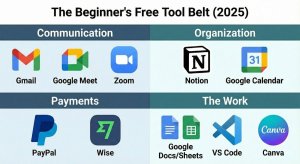
Chapter 8: The Beginner’s Tool Belt (Free Versions)
You don’t need to spend money to make money. Here is the exact stack I recommend for 2025 beginners.
Communication:
- Gmail: For professional communication. (Pro tip: Set up a signature with your name and “Freelance Developer/SEO”).
- Google Meet/Zoom: For client calls.
- WhatsApp/Telegram: NEVER use these for official work unless the client insists. It ruins your work-life balance. Keep it to email or Slack.
Organization:
- Notion (Free): To track your tasks, learning notes, and client list.
- Google Calendar: To block out study time vs. freelance time.
Payments:
- PayPal: The global standard. Fees are high (approx 4-5%), but it’s safe.
- Wise (formerly TransferWise): Better exchange rates for international clients. Use this once you start earning regularly.
The Work:
- Google Docs/Sheets: For content and reports.
- VS Code: For coding.
- Canva (Free): For basic design needs.
Chapter 9: Safety First – avoiding Scams
As a beginner, you have a target on your back. Scammers love freshers because they are desperate.
The 3 Golden Rules of Safety:
- NEVER pay to work: If a “client” asks you to pay a “security deposit” or “ID card fee” to start the project, it is a SCAM. Run away.
- No Free Work (After the sample): It is okay to do a small sample (e.g., 200 words or 1 section of a page). It is NOT okay to do the whole project “as a test.”
- Keep it on the Platform: If you met on Upwork, stay on Upwork. If they try to take you to Telegram immediately to “chat,” be very careful. This is how most scams start.
Conclusion: Your 30-Day Roadmap Starts Now
Freelancing changed my life. It didn’t just give me money; it gave me confidence. It taught me that my skills have value in the real world, not just on an exam paper.
You are at the start of a journey that can give you financial independence before you even graduate. But you have to take the first step.
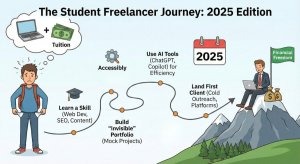
Here is your homework for Day 1:
- Open a notepad.
- Write down which of the 3 skill paths appeals to you (Web Dev, SEO, Content)
Frequently Asked Questions (FAQ)
Q1: Can I freelance using just a smartphone?
- Tarun’s Answer: Honestly? No. You can manage clients on a phone, but you cannot do deep work (Coding, SEO research, Writing long-form) effectively. You need a laptop. It doesn’t have to be a MacBook; a basic Windows laptop is fine.
Q2: How much money can I make in my first month?
- Tarun’s Answer: Realistically? $0 to $100. The first month is about learning and planting seeds. By month 3-4, if you are consistent, hitting $300-$500/month as a student is very achievable.
Q3: Do I need a GST number to start (in India)?
- Tarun’s Answer: No. In India, you can start as an individual. You generally only need GST if your turnover crosses ₹20 Lakhs/year (check current laws as they change). For now, just focus on getting your first client.
Q4: My English isn’t perfect. Can I still freelance?
- Tarun’s Answer: Yes. Your English needs to be functional, not poetic. Clients care if you understand the instructions and deliver the work. Tools like Grammarly (Free) are a lifesaver.
Q5: Is freelancing stable?
- Tarun’s Answer: No, it is a roller coaster. Some months are great, some are quiet. That is why we treat it as a business and save money during the good months.
Small Disclaimer
Freelancing income depends on your skills, effort, communication, and market demand. This guide is for educational purposes and does not guarantee earnings.

Hi, Myself Tarun Kumar author of beviralel.com. As a web developer and SEO specialist with a Masters in Computer Science, I bring over 5 years of practical freelancing experience to my content writing. Everything I share is based on my long experience in freelancing, website development, and SEO.